Launch Your First AI GTM Workflow That Doesn't Suck
Becca Eddleman
More than a few AI sales projects fail because they start too big. They do what companies always do when faced with something new and powerful: they overcomplicate it.
They spin up massive “AI strategy” initiatives and evaluate dozens of tools; they build roadmaps that try to transform the entire sales motion at once.
And then nothing happens.
Reps don’t use the tools, and workflows don’t change; the CRM doesn’t get better. The only real output is a bigger tech stack and more confusion. Meanwhile, the actual problem hasn’t changed: sales teams are still buried in manual work like updating CRM fields, writing call notes, and digging up account context five minutes before a meeting.
But these are spots where AI is extremely useful. In fact, AI can increase sales productivity by up to 40% and reduce the sales cycle length by 25% when applied to tasks such as admin automation, lead prioritization, and forecasting. The upside is literally operational.
You unlock this value by starting with a single AI GTM workflow that simplifies an existing sales task. Not a platform or a strategy deck, but instead a simple but powerful workflow.
In this article, we’ll break down exactly how to do that:
- What an AI GTM workflow actually is (and what it’s not)
- Why CRM enrichment is the best first use case
- A simple, real-world workflow: Google Calendar → CRM → GPT → Salesforce
- How to implement it without overengineering your tech stack
If you get this right, you’ll go far beyond “testing AI” to building something your sales team actually uses.
What an AI GTM Workflow Really Is
The difference between AI tools and AI workflows
Most companies get AI wrong by focusing on new tools rather than processes and workflows. By focusing on “finding a reason to use a tool” instead of focusing on a problem that needs solving.
They buy a new AI platform or AI add-on in existing tools, give reps access, and expect behavior to change, but then it doesn’t, because you need better workflows to fix broken processes instead of just better tools.
Here’s the distinction:
- AI tools are point solutions that generate text, analyze calls, or automate tasks.
- AI GTM workflows (sometimes called agents) connect systems together to execute work across your sales process.
An AI GTM workflow is a connected system that performs a specific task from start to finish.
At a high level, every AI GTM workflow includes four components:
- Trigger → something happens (like a meeting is booked)
- Context retrieval → pull relevant data (CRM, account history, contacts)
- Reasoning (LLM) → generate insights, summaries, or recommendations
- Structured output → push results somewhere useful (like Salesforce)
When these pieces are connected, AI ceases to be a novelty and becomes operational. It’s here that we start to see the real upside.
AI GTM workflows will help you save time, sure, but they also allow you to personalize and execute at a scale human teams simply can’t match. B2B companies that use autonomous sales agents (workflows) for qualification and outreach report up to 5× improvements in conversion rates when engagement is personalized automatically.
That happens because of a better system, not just a better tool.
Why narrow workflows beat “AI everything”
The fastest way to fail with AI is to try to automate your entire sales process at once. It sounds ambitious and impressive, but it also guarantees complexity, low adoption, and an unclear ROI.
The teams that are actually winning with AI are doing the opposite: they start small, and instead of “AI for sales,” they build:
- one job
- one trigger
- one output
And that’s all. Why does this work?
- It’s easier to implement
- It’s easier to measure
- It fits naturally into existing workflows
- Reps will actually use it
A perfect example is CRM enrichment after meetings: it’s repetitive and time-consuming, and it’s consistently done poorly.
Which makes it the ideal candidate for your first AI GTM workflow. Instead of replacing the rep, you’re just removing the most annoying part of their job.
Key Takeaways
- AI GTM workflows are systems rather than standalone tools or chatbots
- The power comes from connecting triggers, data, and outputs, rather than just generating content
- Narrow, focused workflows s drive faster adoption and clearer ROI
- The goal is simple: eliminate repetitive sales work without disrupting the process
Ready to build your first AI GTM workflow? See how Skaled’s AI Sales Automations turn these principles into production-ready systems, without the overengineering.
The Best First AI GTM Workflow: CRM Enrichment
The hidden problem inside most CRMs
Let’s be honest: most CRMs are a mess.
Not because the system is bad, but because the inputs are inconsistent and incomplete, and often rushed.
Common issues show up all over the place:
- Missing or outdated contact details
- Vague or unusable meeting notes
- Inconsistent activity logging across reps
- Little to no real account context
And these aren’t small problems. They stack up. When your CRM is unreliable:
- Forecasting becomes guesswork
- Pipeline reviews become subjective
- Account strategy lacks real insight
- Managers spend more time chasing updates than coaching
The root issue is just friction. Reps are expected to prep for meetings, run the call, follow up, and update the CRM, and that’s a lot. The result is that something often gets skipped, and that’s usually the CRM. That’s exactly where an AI GTM workflow creates immediate value.
Why CRM enrichment is the ideal first AI sales system
If you’re launching your first AI sales system, CRM enrichment is the best place to start. And why is that? Because it works. This use case checks every box:
- Low risk → You’re not touching core deal logic
- Measurable → You can track completeness and activity rates
- Behavior-aligned → It fits directly into existing rep workflows
- Easy to deploy → No massive system overhaul required
More importantly, it improves both sides of the sales equation:
For reps, it means:
- Faster meeting prep
- Less time writing notes
- Better context going into calls
For leadership, it means:
- Cleaner CRM data
- More consistent activity tracking
- Better visibility into pipeline health
This is exactly how high-performing teams think about AI; they start with removing friction from high-frequency tasks, and CRM enrichment sits right at the center of that.
It turns one of the most painful parts of the sales process into something that happens automatically in the background.
Key Takeaways
- CRM data quality is one of the highest-leverage problems in sales
- AI GTM workflows can solve it without changing rep behavior
- Reps get immediate time savings and better context
- Leadership gets more reliable data for forecasting and decision-making
The AI GTM Workflow Architecture
At this point, it’s easy to assume this requires a complex system with heavy engineering, but we’re happy to tell you that it doesn’t. A strong AI GTM workflow is just a structured automation pipeline that connects the tools you already use in a logical sequence.
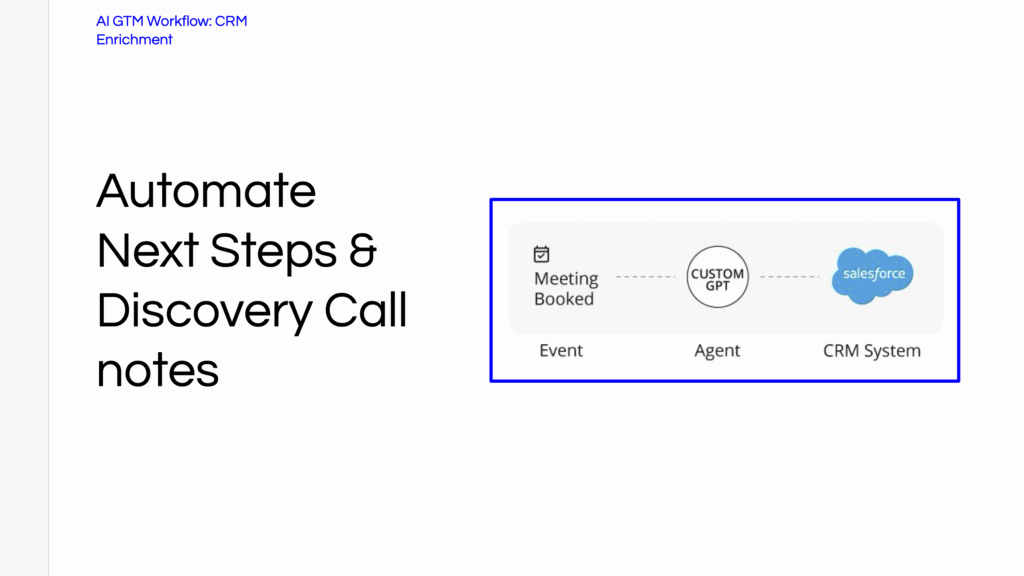
The core architecture is like this: Google Calendar → CRM account lookup → AI summary generation → Salesforce logging
And that’s it; just a clean flow of data from one system to another. To break down what’s happening:
- Google Calendar (Trigger Layer): A meeting is created, updated, or completed; this triggers the workflow.
- CRM (Context Layer): The system pulls in account, contact, and activity data to understand who the meeting is with and what’s already known.
- AI (Processing Layer): GPT (or another LLM) takes that context and generates a structured summary, insights, or recommendations.
- Salesforce (Output Layer): The results are written back into the CRM: updating records, logging activity, and enriching data automatically.
What matters here is how these tools are connected. Most sales teams already have all of these systems in place:
- Calendar
- CRM
- Some form of AI
- A system of record, like Salesforce
A problem is that they tend to operate in silos, but this workflow turns them into a single system that executes work end-to-end. That’s the change:
- From tools → to workflows
- From manual updates → to automated enrichment
- From scattered data → to structured outputs
And once this foundation is in place, you can layer on more workflows over time. But it starts here, with a simple, connected workflow that actually does something useful.
Step-by-Step: How the AI CRM Workflow Works
Now, let’s break this down into what actually happens behind the scenes. This is where many teams overcomplicate things, but in reality, a strong AI GTM workflow is just a sequence of simple, connected steps.
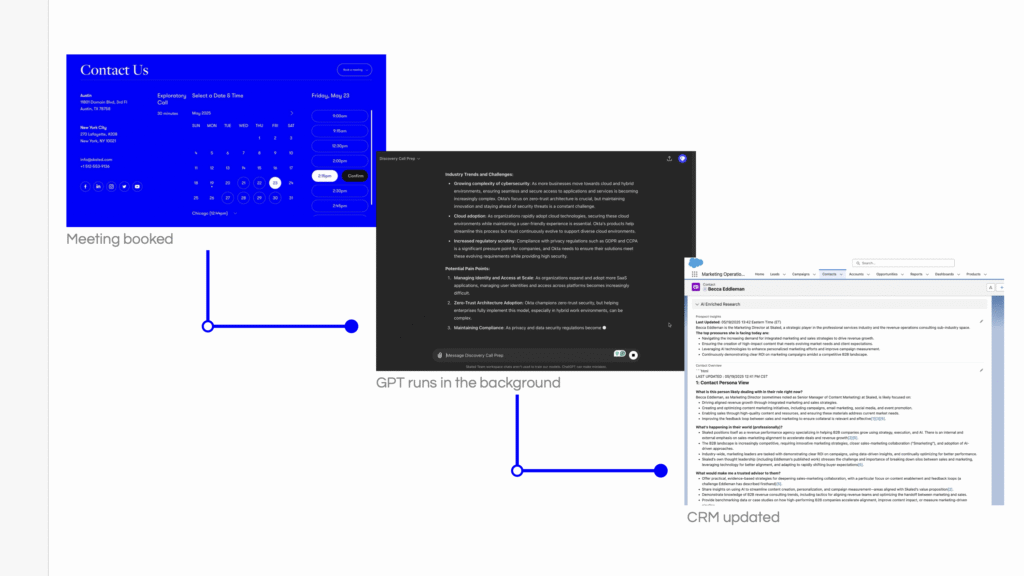
Step 1: Meeting Trigger (Google Calendar)
Everything starts with a trigger. In this case, it’s a calendar event:
- A meeting is created
- A meeting is updated
- A meeting is completed
That event becomes the starting point for the workflow, and from the calendar, the system pulls:
- Meeting title
- Attendees (emails + names)
- Company domain
This becomes the workflow’s raw input. At this stage, nothing intelligent has happened yet; you’re just capturing the signal that something worth processing has occurred.
Step 2: CRM Account & Contact Enrichment
Next, the workflow connects that meeting data to your CRM. The system matches attendees to:
- existing contacts
- associated accounts
- open opportunities (if applicable)
…And from there, it can:
- Identify the correct account
- Pull company and deal context
- Check for missing or outdated fields
- Enrich or update contact data
This step is really important: AI without context produces generic output at best, but AI with context produces something useful.
By the time you reach the next step, the system understands:
- who the meeting is with
- what company they belong to
- what’s already happened in the account
And now you’re ready for intelligence.
Step 3: GPT Generates a Meeting Summary
With context in place, the AI layer can now do real work. It processes:
- meeting details
- CRM data
- historical activity and notes
And then it generates a structured summary. Not a paragraph or a wall of text, but good, useful, structured output. An example format follows.
- Company snapshot → what they do, relevant context
- Key stakeholders → who’s involved and their roles
- Previous activity summary → what’s already happened
- Likely discussion topics → what this meeting is about
- Suggested next steps → what should happen after
This is what turns AI from “interesting” into “useful.” Instead of reps going into meetings blind or spending 10 minutes scrambling for context, they get a clean and actionable brief.
Step 4: Salesforce Logging
The final step is where most of the value begins to build. Everything gets written back into the CRM: automatically. That includes:
- Meeting notes
- Account activity summaries
- Updated contact fields
- Opportunity updates (if relevant)
This eliminates one of the biggest failure points in sales: manual CRM entry. Instead of relying on reps to log everything after the fact, the system does it for them. Now your CRM becomes:
- more complete
- more consistent
- more useful
And most importantly, it stays that way.
At this point, you’ve turned a simple meeting event into this:
- enriched account data
- structured insights
- clean CRM updates
And it’s all done without adding extra work for the rep. That’s what a real AI GTM workflow looks like in practice.
What the Sales Rep Actually Sees
All of this only works if the rep actually feels the benefit, however. If your AI GTM workflow creates more work, requires new tools, forces behavior change, or anything else like this, it will probably fail.
The goal is simple: make the rep’s job easier without asking them to do anything new.
And here’s what that looks like in practice.
Before the Meeting
Instead of scrambling for context five minutes before a call, the rep gets a clean, AI-generated prep brief, delivered where they already work (email, Slack, or CRM). The brief includes:
- Company summary → what the company does and why it matters
- Account history → previous meetings, notes, and deal activity
- Key stakeholders → who’s attending and their roles
- Contextual insights → relevant talking points or risks
No digging through Salesforce, or switching between tabs; no guessing, either. The rep shows up prepared by default.
After the Meeting
This is where the biggest improvements can be seen: instead of writing notes and updating the CRM manually, the rep gets:
- An AI-generated meeting summary
- Suggested follow-up actions
- Pre-filled CRM updates
All they have to do is review and make quick edits if needed.
The Workflow Shift
Without AI: Write notes → update CRM → forget details → create inconsistent data
With an AI GTM workflow: Review → edit → approve
And that’s the whole job. Not bad, right?
Why This Drives Adoption
AI projects fail because they ask reps to:
- learn a new tool
- change their behavior
- trust a system they don’t understand
This does the opposite.
- It fits into existing workflows
- It removes tedious work
- It delivers immediate value
Reps don’t adopt this because leadership tells them to; they adopt it because it saves them time. And that’s the only adoption strategy that really works.
Guardrails That Prevent AI Workflows From Breaking
A lot of AI GTM workflows fail because there are no guardrails.
Without structure, AI outputs become inconsistent, and without constraints, data gets messy. And it’s easy to lose trust in something that doesn’t have proper oversight. If you want your AI GTM workflow to work in production, you need a few simple rules.
Keep the first version simple
The biggest mistake teams make is trying to build too much, too fast. They layer in:
- multiple triggers
- multiple outputs
- complex logic
- edge cases
And suddenly, the workflow becomes fragile and hard to maintain. So instead of doing that, try to start with just three things:
- one workflow
- one trigger
- one output
And remember that you can always expand later. But the first version has to be simple, or it probably won’t get adopted.
Never let AI overwrite critical CRM fields
AI should assist your system, but not take control of it. There are certain fields that should never be automatically overwritten, such as:
- revenue
- opportunity stage
- deal value
- close dates
This is because these fields directly impact forecasting and reporting, and one bad update can create downstream issues across the entire revenue organization.
Instead, you should take this approach:
- Use AI to suggest updates
- Require human approval for critical changes
- Limit automation to non-destructive fields (notes, summaries, enrichment)
This keeps your CRM trustworthy.
Structure the AI output
Unstructured AI output is where things start to break, because if every summary looks different, reps won’t trust it, and it might truly be less reliable. The fix is just that you should force structure to be used.
You can use predefined formats like:
- Meeting summary
- Key takeaways
- Next steps
- CRM update notes
This ensures that you’ll have:
- consistency across reps
- predictable outputs
- easier CRM integration
It helps us when we remind ourselves that AI works best when it operates within clear boundaries. You might print or write that and stick it to your monitor.
Key Takeaways
- Governance matters more than the model
- Simpler workflows drive better adoption and reliability
- AI should assist workflows, not replace decision-making
- Structure and constraints are what turn AI into a usable system
How to Measure If Your AI GTM Workflow Is Working
If you can’t measure it, we’re sorry to say that you didn’t build a workflow; you just built a demo. A lot of AI initiatives fall apart at this point: teams launch something that “feels useful” but never define what success really looks like.
A good AI GTM workflow should produce a clear and immediate operational impact, and you should be able to prove it works quickly. A successful AI GTM workflow does three things:
- Saves time immediately (reps feel it)
- Improves data quality quickly (managers see it)
- Impacts revenue over time (leadership measures it)
If you’re not seeing all three, something in the workflow needs to be adjusted.
Sales Productivity
We’d recommend that you start with the most obvious thing to succeed with: saving time. Your workflow should reduce the amount of manual work reps are doing every day. Key metrics include:
- Hours saved per rep per week
- Time spent on meeting prep
- Time spent on post-call admin (notes + CRM updates)
If your AI workflow is working, reps should feel this immediately. There should be less busywork and more time spent selling.
CRM Data Quality
The second layer of impact is data; your CRM should become more complete and more consistent without relying on rep discipline. We recommend that you track:
- Activity logging rate. Are meetings being captured consistently?
- Account completeness. Are key fields filled in?
- Consistency of notes and summaries across reps
This is where leadership starts to see value. Cleaner data → better visibility → better decisions.
Revenue Impact
Revenue impact is, of course, the long-term signal. Once the workflow is in place and adoption is consistent, you should start to see improvements in pipeline performance. Key metrics for this include:
- Meeting-to-opportunity conversion rate
- Deal velocity (time to close)
- Consistency in your pipeline progression
You can’t expect overnight transformation, but you should see directional improvement.
Your First AI Workflow Should Be Boring (And That’s Good)
Too many teams think AI in sales starts with automation at scale, but it doesn’t really. Instead, it starts with fixing the small, repetitive workflows that slow everything down. That’s the change a lot of organizations miss; they jump straight to things like:
- autonomous outbound
- AI SDRs
- full pipeline automation
But without a strong operational foundation, those systems break. Or, worse, they get ignored.
The teams succeeding with AI are building AI GTM workflows first.
The Real Insight
AI sales transformation begins with workflow automation. When you connect your systems and remove friction from daily tasks, you create:
- cleaner data
- faster execution
- more consistent processes
That’s what makes everything else possible. Because once your workflows are structured, you can start layering intelligence on top of them.
What Winning Teams Do Differently
The highest-performing teams follow a simple pattern:
1. Identify repetitive work
They look for tasks reps do every day:
- meeting prep
- note-taking
- CRM updates
If it’s frequent and manual, it’s a candidate for automation.
2. Build narrow automation workflows
They don’t try to automate everything. They build:
- one workflow
- one use case
- one clear outcome
Then they do their best to make it reliable.
3. Integrate into existing systems
High-performing teams don’t introduce new tools reps have to learn, but instead plug AI into calendar, CRM, and communication tools, so the workflow runs where work is already happening.
From Workflow → System
This is where it starts to build on itself. Once you have one working AI GTM workflow, you can expand in ways like these:
- Add more triggers (emails, calls, pipeline changes)
- Add more outputs (forecast updates, alerts, insights)
- Connect more systems
Over time, you’re no longer running isolated automations and have instead begun to run a connected AI sales system.
The Big Picture
AI isn’t replacing your sales process, but it is becoming the execution layer inside of it, and the companies that understand this early are building systems that:
- move faster
- operate with better data
- scale without adding headcount
And it all starts with something small: one solid workflow.
Stay ahead of the curve. The AI GTM playbook is still being written. Subscribe for resources, frameworks, and real-world workflows delivered straight to your inbox.