
A Day in the Life of an AI-Powered SaaS Seller in 2026
Becca Eddleman
You started the day with good intentions, but between scrambling for prep, logging notes in the CRM, managing your inbox, and getting ready for your 1:1, the hours disappeared. And somehow, you only had one real sales conversation. Meanwhile, your competition did all of that in under 30 seconds using AI assistants. This isn’t a “future state.” It’s happening right now.
AI users in GTM roles save an average of 11–12 hours per week by automating manual, repetitive tasks and enabling you to focus on higher-value activities
The old way, where reps waste half their day prepping, context switching, and manually logging notes, is being replaced by a new standard: the AI-powered seller. Not a bot. Not a replacement. A modern rep equipped with assistants that streamline everything except the part that counts: the conversation.
The goal isn’t to replace sellers, but to remove everything that gets in their way. In this new model, reps aren’t bogged down by admin work. They’re showing up informed, engaged, and ready to have better conversations. That’s the whole point.
Here’s what you’ll learn in this tactical breakdown:
-
- How to run a V1 AI-powered sales day starting this week
- How to shift from grunt work to high-impact selling
- What the new seller playbook looks like across four key phases of the day
And the best part? These aren’t abstract concepts. Every AI workflow you’ll read about here can be implemented in weeks, not months.
Related Content:
The Three AI Assistants Reps Should Be Using Every Day
Today’s Reality: Sellers Drowning in Admin
The average seller’s day hasn’t changed much in the last decade. It starts with a calendar full of calls, a pit in your stomach, and a mad dash to prep before your one-on-one with your manager. Sound familiar?
You skim a company’s website, poke around LinkedIn, and try to scrape together a few talking points. Maybe, if there’s time, you paste a few notes into Salesforce before the meeting starts because you’re required to. It’s reactive. It’s scattered. And it’s what most reps still consider “normal.”
Here’s the breakdown:
-
- Prep is shallow. Most sellers are still doing surface-level research minutes before the call.
- Conversations are underwhelming. Buyers can tell instantly when reps haven’t done the work.
- Follow-up eats the day. After the call? Manual notes. Manual follow-up. Manual logging.
You’re constantly working, but rarely selling. And the data backs it up: Reps spend just 35% of their time in actual sales conversations.
Why?
When 60-70% of rep time is now technically automatable through AI or digital tools.
This is the cost of sticking to the “old way” that feels comfortable, but needs to change.
Do You Want to Pay Sellers to “Pay Their Dues”?
If you’re a frontline manager or director reading this, listen up: For years, sales teams have accepted inefficiency as a rite of passage.
Reps are expected to earn their stripes by spending hours doing manual research, writing follow-ups from scratch, logging calls, and preparing for 1:1s with minimal support. The assumption is: if they grind hard enough, they’ll eventually get better.
But here’s the truth: effort does not equal effectiveness.
If your sellers are stuck in admin loops and shallow prep, you’re not building better reps, you’re just burning cycles. You’re buying effort, not outcomes.
There’s no badge of honor in wasting time.
Modern sales orgs are flipping this mindset. Instead of glorifying grind, they’re designing systems that remove friction, so reps can focus on what actually moves the needle: better conversations, tighter messaging, and deeper engagement.
Related Content:
The 5 Levels of AI Proficiency in Frontline Sales
The 4-Part Playbook: Rebuilding the Seller’s Day with AI
Let’s be clear: this isn’t a futuristic vision of sales. This is the V1 version that’s already possible today using AI Assistants that you can deploy in weeks, not months.
This is the day-to-day of a modern B2B SaaS seller who’s no longer spending hours on research, note-taking, or logging into multiple platforms just to keep up. Instead, they’re using purpose-built AI Assistants to handle prep, follow-ups, and prospecting support.
When done right, the result is a day filled with nothing but quality conversations. Every meeting is strategic. Every touchpoint is intentional. No more wasted hours. No more shallow prep.
Here’s how that day breaks down, and how you can start running it.
1. The Day Before
What it looks like today
The end of your day should be when you prep for tomorrow, but let’s be honest, you’re probably just trying to catch up. Follow-ups, CRM updates, unanswered Slacks, and back-to-back meetings pile up, and by the time it’s quiet, your energy is shot.
If you do manage to prep, it’s usually reactive:
-
- You skim the company’s homepage, hoping to extract a value prop
- You jump to LinkedIn to find your contact, and guess what matters to them
- You copy notes into Salesforce just to check the box
- And more often than not, you push prep to the morning, which puts you behind before the day even starts
It’s rushed. It’s inconsistent. And it keeps you in a cycle of showing up underprepared.
What it looks like with AI Assistants
Now imagine this instead: you block 15–20 minutes at the end of your day and prep everything for tomorrow using an AI Assistant.
Drop your meeting link or company name into an Assistant built for Deep Account Research or Call Prep, and in minutes, you’ve got:
-
- A full overview of the company: what they do, how they position themselves, and why they matter to you
- A LinkedIn summary of the buyer, including talking points and relevant activity
- Insights tied directly to your product and your target persona
- Optional extras like competitor mentions, recent news, or angle suggestions for outreach
You’re not digging through tabs. You’re not guessing what to say. You’re scanning clean insights, custom-generated for your exact workflow, and queuing up for tomorrow.
And if you’ve got more than one meeting? Run them back-to-back. Batch your prep in minutes. Close your laptop with clarity, not chaos.
2. The Morning
What it looks like today
Your day starts with noise.
Slack is already pinging. Your inbox is full of threads you don’t remember. You’ve got a one-on-one later, a few meetings on the calendar, and a vague sense that you should be “doing outbound” — whatever that means today.
There’s no clear starting point. So you default to motion:
-
- Rewriting that email you forgot to send yesterday
- Clicking through tabs looking for your prep notes
- Manually assembling a follow-up doc for your manager
- Staring at Salesforce, trying to remember what actually matters
You get to your first meeting feeling underprepared. Your talk track is off. You end up saying something generic like, “Tell me more about your business,” and just like that, the buyer checks out.
By 10 am, you’ve already burned energy, and you haven’t sold a thing.
What it looks like with AI Assistants
You start your morning focused because you already did the heavy lifting yesterday. Instead of scrambling, you open your calendar and launch into execution mode:
-
- Pre-read briefings are already attached to your meetings
- Key contacts are summarized with relevant LinkedIn context
- Talking points are pre-generated and mapped to each persona
Need to send outreach? Open your Outbound Meeting Copilot or a similar Assistant. Drop in the job title and company link. You’ll get:
-
- A short list of pain points tailored to that role and industry
- Recent news or competitor signals you can mention
- Suggested email copy you can personalize in seconds
Instead of wasting time researching what to say, you’re choosing how to say it.
Have a one-on-one with your manager? Use a Sales Manager Assistant to build a custom agenda based on pipeline updates and what you want to cover. It’s done in less than five minutes — and you walk in looking like the most prepared person on the team.
You’re not overwhelmed. You’re not guessing.
You’re in control, and it’s still only 9:30.
3. The Afternoon
What it looks like today
By the time the afternoon hits, you’re drained.
You’ve been in back-to-back meetings, juggling tabs, taking notes while trying to sound present, and now you’ve got a pile of follow-ups waiting with zero energy to tackle them.
So you:
-
- Rewatch call recordings to piece together next steps
- Write one-size-fits-all recap emails that feel rushed
- Manually log notes into Salesforce just to stay compliant
- Push half your tasks to tomorrow (again)
It’s exhausting. And it leaves you wondering what you actually accomplished.
What it looks like with AI Assistants
Now, imagine you finish a call, drop the transcript into your RepGPT, and it instantly gives you:
-
- Three tailored recap emails, one for the decision-maker, one for the end user, one for the technical buyer
- A synthesized summary of the call you can paste straight into Salesforce
- Suggested follow-up actions, pulled directly from what was said
You review, personalize, and send all in under 10 minutes.
Instead of struggling to remember who said what, you’re sending the best follow-up of your life before the next meeting even starts.
Now you even have time to social sell.
Paste a recent LinkedIn post from a prospect into your Social Media Assistant, and it’ll generate a thoughtful comment or response tailored to your audience. You can tweak it, post it, and stay top-of-mind, all in under three minutes. This isn’t fluff. It’s strategic visibility that would’ve never made the cut in your old schedule.
4. Wrapping Up for Tomorrow
What it looks like today
It’s the end of the day. Your brain is cooked. You’ve got unread emails, half-written follow-ups, and a vague feeling that tomorrow’s going to start just like today – in a scramble.
You try to plan, but:
-
- You’re too tired to think strategically
- You’re unsure what’s even on the calendar
- You make a mental note to prep in the morning (again)
You close your laptop, not with confidence but with relief.
What it looks like with AI Assistants
You end the day the way you started: in control.
First, you block off 20 minutes for deep account research using Assistants like RepGPT or Deep Account Research, the same Assistants mentioned earlier, to prep for tomorrow’s meetings. Each briefing gives you company context, persona insights, and suggested talking points you can scan in minutes.
Then you spend another 15 focused minutes queuing up your workflow for the next day:
-
- Reviewing your calendar with talking points already attached
- Generating next-best actions for key accounts
- Having your Assistant flag pipeline risks or open loops from today
Some reps even automate that last step. When a new meeting appears on your calendar, an Assistant runs the research behind the scenes and attaches the summary to the invite — so it’s waiting for you the next morning.
Instead of shutting down in chaos, you shut down with clarity.
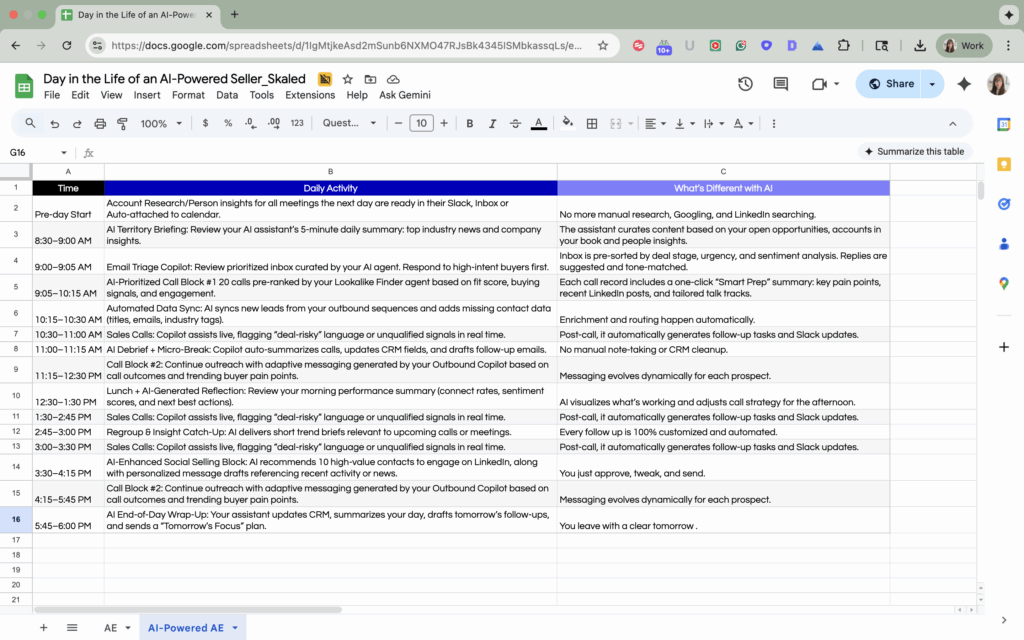
Copy the “Day in the Life” Calendar
All You’re Doing Is Having Quality Conversations
This is what it looks like when AI Assistants take everything but the conversation off your plate.
No more tab juggling. No more rushed prep. No more feeling like you worked all day but didn’t actually sell anything.
Instead, your entire day flows through high-impact moments:
-
- Every meeting is strategic because you came in prepared.
- Every follow-up is thoughtful because AI gave you a head start.
- Every outbound touch is targeted because context isn’t optional anymore.
This is what it looks like when you take the first real step into AI-powered selling, no full-blown automation, no overcomplicated workflows. Just smart Assistants, set up in weeks, helping you focus on what matters most: having great conversations with buyers.
If you want to see what this looks like inside your own sales org, learn more about how AI Assistants work and how fast they can be deployed.
Frequently Asked Questions about AI in B2B Sales:
1. What does a typical day look like for an AI-powered B2B sales rep?
An AI-powered B2B sales rep spends less time on manual tasks and more time in quality conversations with buyers. Their day is supported by AI Assistants that handle research, prep, follow-ups, CRM updates, and task prioritization. Instead of scrambling between tools or rewriting emails, reps walk into meetings fully prepared and use the time between calls to advance deals, not catch up on admin.
2. How can sales reps use AI assistants to save time during their workday?
Sales reps can use AI Assistants to automate time-consuming tasks like account research, drafting personalized outreach, summarizing call transcripts, logging CRM notes, and prepping for 1:1s. With these tasks off their plate, reps reclaim hours every week and shift focus toward selling.
3. Which parts of a SaaS seller’s day can be automated with AI?
AI can automate or accelerate major parts of a SaaS seller’s workflow, including:
-
- Pre-call account research
- LinkedIn and email personalization
- Post-meeting recap emails
- CRM note logging
- Pipeline health monitoring
- Task and meeting prioritization
These automations reduce busywork and allow reps to spend more time with high-intent prospects.
4. What’s the difference between AI-powered selling with Assistants and full AI automation?
AI-powered selling with Assistants means reps still lead the process, but they’re supported by tools that remove friction. It’s human-first, tech-enabled. Full AI automation removes the human from certain parts of the cycle entirely, like chatbot prospecting and running full prospect research from a form trigger. Assistants keep the rep in control, while automation replaces parts of the workflow entirely.
5. How long does it take to implement AI Assistants in a B2B sales organization?
Most AI Assistants can be deployed in under 3 weeks without requiring full tech overhauls or major process changes. Reps can start using standalone tools to support prospecting, meeting prep, and follow-ups within days. It’s one of the fastest ways to increase seller productivity without a heavy lift from RevOps or IT.