
The AI Usage Gap: 86% of GTM Teams Use AI Daily, But Most Still Aren’t Changing How Work Gets Done
Becca Eddleman
Your reps are using ChatGPT. Your marketers are using Claude. Your RevOps team has probably tested five AI features inside tools they already pay for. Everyone is “using AI.”
And yet, the business impact still feels suspiciously small.
We’ll go deeper into the business impact in the AI ROI gap next week, but the first place to start to diagnose this discrepancy is to peel back why “AI adoption” across sales and marketing sounds high, yet when we talk to clients and peers, most are nowhere near what the industry is promoting.
The AI usage vs AI adoption distinction matters because AI usage is individual behavior, whereas AI adoption is AI-integrated organizational change. You’ll see high adoption rates across industries in different AI surveys and reports, but these numbers can be misleading without this distinction.
AI has made its way into daily work, but not into how most GTM organizations actually operate – that’s the gap.
Skaled’s AI GTM Pulse data shows that 86% of GTM teams use AI daily or on almost every task, but only 33% have AI automations that complete GTM tasks for them.
Individual usage is very high. It’s team and workflow adoption that is lagging, and most companies still confuse AI usage with AI adoption: manual use of AI vs. true AI workflow integration.
If this hits, we’re going to break down what this means for organizations in a few ways, then share the steps you can take to build true AI-integrated workflows that lead to real adoption and real results.
- Why heavy AI usage is not producing the transformation leaders expected
- The usage gap in GTM teams and what the data shows
- What separates AI-assisted work from AI-integrated workflows
- The real barriers to AI adoption
- What leaders need to do next to move from scattered experiments to measurable GTM impact
Survey note:
Skaled’s AI GTM Pulse survey was conducted in April 2026 to understand how GTM teams are using and operationalizing AI. In the final report, we bring those insights together, connecting the dots across usage, automations, ownership, and measurement.
See the full AI GTM Pulse results
Why Heavy AI Usage is Not Producing the Transformation Leaders Expected
Let’s talk about the difference between usage and adoption. How we think about this is individuals using AI consistently vs a team using AI consistently and in the same way.
AI usage is individual behavior
Usage is a rep using ChatGPT to draft an email, a marketer using Claude to rewrite a campaign brief, or a customer success leader using Copilot to summarize a messy meeting transcript.
And imagine these GTM professionals performing the individual steps of feeding inputs to generate outputs, then moving that information elsewhere. It’s still very manual and changes from case to case. This kind of usage speeds up isolated tasks. It does not change how work gets done within the GTM engine.
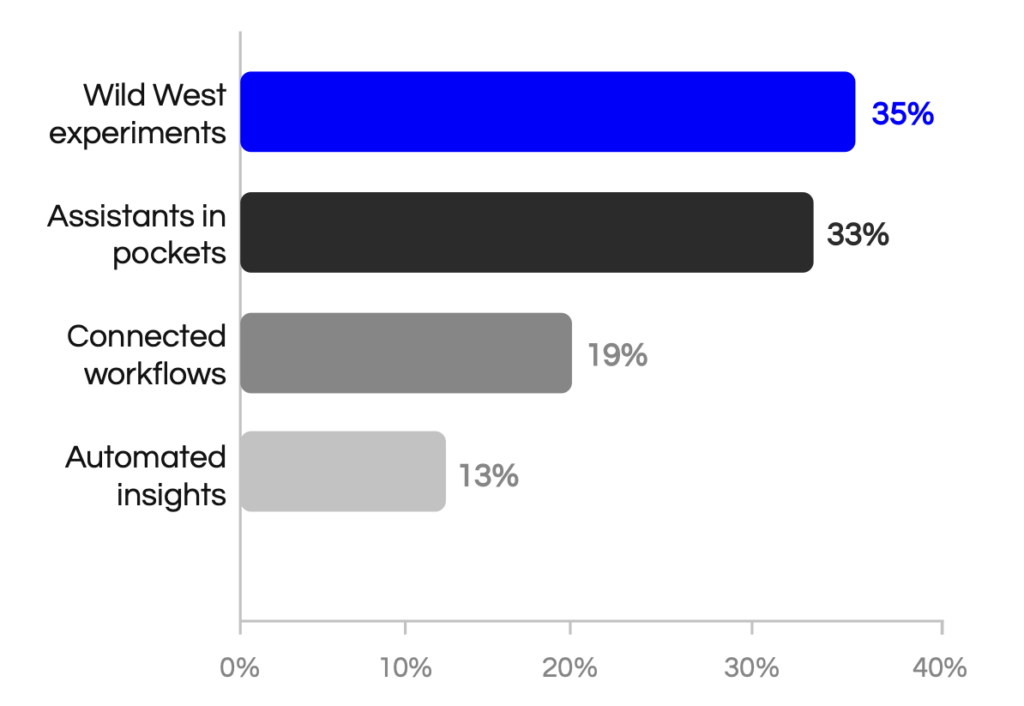
This is where most teams are today. 35% of organizations are still in the Wild West prompting stage, and 33% are using assistants in pockets.
Meaning a handful of people within your organization are fast, creative, and consistent with AI. They’ve got saved prompts. They’ve got custom GPTs (aka assistants). They’ve got a workflow that looks impressive until you realize it lives entirely in their head.
We now have pockets of productivity within organizations, but they do not yield a scalable process. When a person stops using the workflow, the workflow ceases to exist. It’s classic GTM house-of-cards behavior.
AI adoption is organizational change
AI adoption starts when AI becomes part of the process. Think multi-step AI-integrated workflows with humans in the loop at different stages to approve and complete.
AI is integrated into the GTM process with consistent, measurable outcomes. For example, these AI-integrated workflows could be:
CRM notes are logged automatically after a call
Instead of a rep downloading the call transcript, uploading it to ChatGPT to extract the main points, and then copying and pasting that answer into Salesforce, an AI workflow or agent is triggered when the call ends, extracts the main points (and suggests next steps if you want to add that), uploads it to Salesforce automatically, and logs your next task.
Blog-to-campaign repurposing
Instead of copying and pasting a blog into an AI tool and requesting three LinkedIn posts and a newsletter blurb, reviewing the output, and manually scheduling the content, an AI workflow or agent is triggered when a new blog is published, generates three LinkedIn posts, one newsletter blurb, and two sales enablement snippets, sends the draft to the marketer for final review, and schedules the content/sends it where it needs to go once approved.
At-risk account detection and action planning
For customer success, instead of manually prompting and uploading five support tickets, telling ChatGPT to analyze if this customer is unhappy, teams can set up an AI workflow or agent that monitors every customer account weekly, flags accounts showing risk, summarizes why they are at risk, and recommends the next best action for the team.
Again, these are workflows set up for everyone on your team, using your organization’s approved data, branding, and messaging. Instead of one to two power users, the whole team has adopted the same process, workflows, and agents.
This is where your GTM engine transformation begins – at the team level.
Related Content: AI Assistants vs. AI Agents: What to Use & When
The AI Usage Gap in GTM Teams: What the Data Shows
As we stated before, 86% of GTM professionals use tools like ChatGPT to draft an email or article, but only 33% automatically log, sequence, and route tasks.
The first three questions we asked in the GTM pulse survey were:
- How often do you use tools like ChatGPT, Claude, or Copilot?
- Are AI tools built into your team’s daily GTM workflows?
- Do AI automations complete GTM tasks for you (not enrichment/tools)?
This is the difference between prompting (question 1), legacy tools with a new AI feature (question 2), and multi-step AI automations (question 3). Let’s break it down.
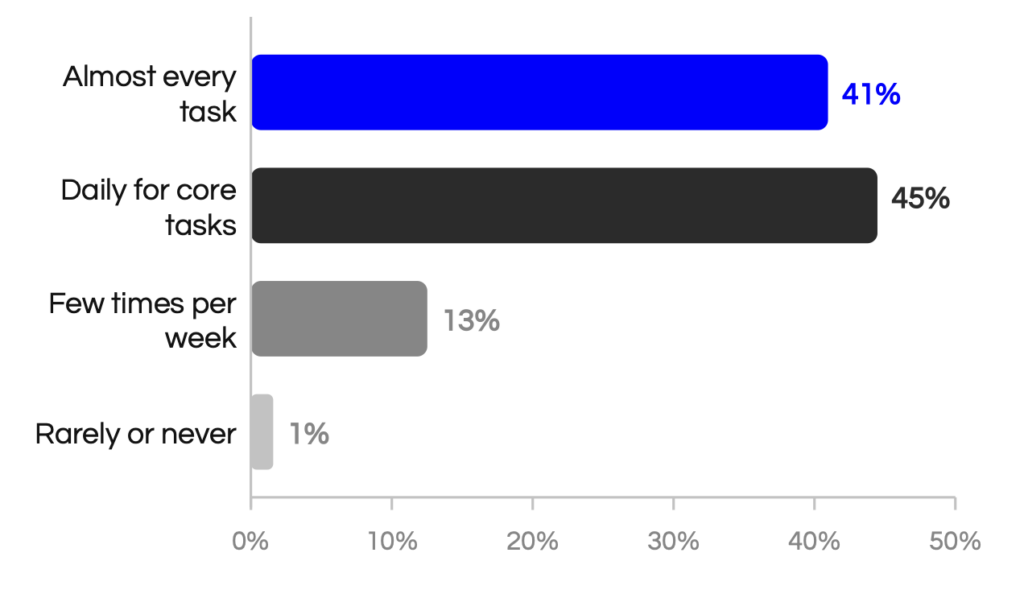
86% of GTM teams use AI daily or on almost every task
This tracks with what we’re seeing on the ground. Tools like ChatGPT, Claude, and Copilot have become commonplace for most GTM professionals, and usage continues to grow every year.
But individual habit is not the same as team-level integration. The real question is whether this usage is structured, repeatable, and tied to outcomes. Or is it ad hoc prompting with no strategic foundation?
Based on the next two data points, we can conclude that most AI use is either ad hoc or individual-level systematization.
How often do you use tools like ChatGPT, Claude, or Copilot?
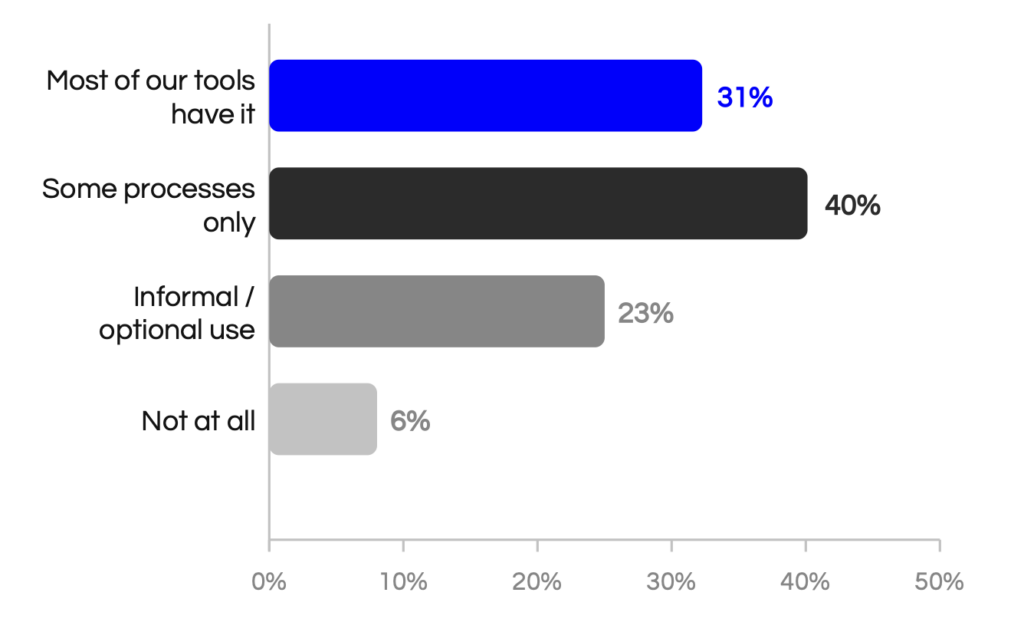
63% still say AI workflows are informal or only partially embedded
While 31% of respondents said most “tools have AI,” nearly 63% describe use as either informal/optional or limited to some processes. That’s not team-level adoption. Most likely, it’s a purchase decision that didn’t go anywhere.
This is another instance where GTM impact falters, and business objectives aren’t met.
First, we saw high individual usage without team integration; now we’re seeing products without process integration.
Informal, optional use means results vary by rep, and if it’s not built into the process for everyone, you can’t pinpoint what’s working and what’s not, or scale it.
Are AI tools built into your team’s daily GTM workflows?
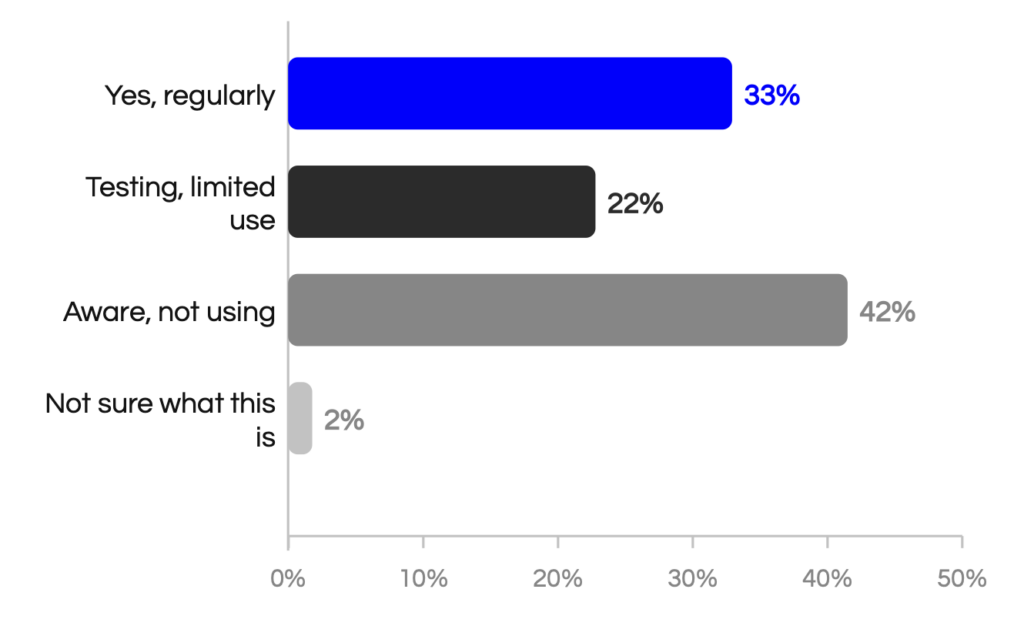
Only 33% have AI automations completing GTM tasks
When you probe deeper into AI automation, most people describe AI-assisted tasks rather than true end-to-end automation.
There’s a meaningful difference between an AI chatbot inside your marketing automation platform, or AI content tools built into that same platform that ask if you want it to generate a subject line or enrich a contact.
That’s the “tools have it” statement. These features can again speed up isolated tasks. It’s not AI automation. It’s not an AI-integrated workflow.
Here is where the number gets even lower. Only about a third of teams are using AI-integrated automations and workflows. Almost half are aware of the capabilities, but still not using them.
Do AI automations complete GTM tasks for you (not enrichment/tools)?
68% are still in Wild West or pocket-assistant mode
The market narrative suggests most organizations are transforming and further along than they really are, but here we see that almost 70% of respondents fall into the Wild West or Assistants in pockets category.
This is good news for you and your team. If you fall into one of these first two categories, you’re not as far behind competitors as you think, but you still are missing out on the opportunity gains from AI and automating non-selling, tedious, low-value tasks. Or automating high-value tasks where Customer Success gets risk alerts before the risk becomes too great.
What stage best describes your company’s AI GTM Maturity today?
What Separates AI-Assisted Work from AI-Integrated Workflows
The better way to describe why your organization is using AI daily (or on almost every task), but you’re still not seeing ROI, is the difference between AI-assisted work and AI-integrated workflows.
Optimizing an individual’s tasks is great; it saves time, but organizations have to reach the next level of AI GTM maturity before they’ll start seeing ROI across the team, rather than just a few A+ people or A+ campaigns. The change has to be organizational to be scalable.
AI-Assisted (Where most teams are)
Most AI use is still human-initiated. A rep opens ChatGPT, types a prompt (or uses a GPT), and copies the output into their CRM or email. Human-initiated, human-executed.
We’re also going to double down on the fact that embedded AI features are not the same as workflow integration.
Most tools now include some form of AI. A CRM with AI summaries is helpful. But if no one has defined when summaries are created, where they go, who reviews them, and what action they trigger, the workflow still depends on human follow-through. Embedded features do not automatically create an integrated process.
True AI Integration (Where teams want to be)
A trigger fires when a deal changes stage. AI logs the summary, drafts the follow-up, and routes the next step with little human intervention.
Sound familiar? It’s the same idea as individual usage vs. team adoption. Manual inputs vs. workflows and automations. One rep as a power user vs. the whole team being power users.
AI assistance improves tasks. AI workflow integration changes behavior and improves the GTM engine.
| AI-Assisted Work | AI-Integrated Workflow |
| Rep prompts ChatGPT for an email | Deal trigger generates follow-up automatically |
| Manager asks AI to summarize calls | AI flags risk across pipeline reviews |
| Marketer drafts copy with AI | Campaign insights update segmentation logic |
| RevOps tests AI manually | AI automates routing, logging, enrichment, or alerts |
The Real Barriers to AI Adoption
Before we get to how to move to true AI-integrated workflows and automations, we should also address common barriers to AI adoption.
If you’re ready to truly start automating and improving work with AI, here are a few things to avoid.
1. No clear leadership push
35% of respondents said that their AI pilots stalled due to a lack of leadership push. Without executive sponsorship, AI initiatives get deprioritized the moment a quota call or a budget review comes up. If leadership deprioritizes, that trickles down.
Executives need to publicly commit to AI goals, lead regular AI review sessions, and require teams to report progress, learnings, and adoption milestones. They need to commit to transformation.
2. Poor data quality
32% or respondents said that their AI pilots stalled because of bad data. AI amplifies what exists in your systems. If CRM hygiene is poor, pipeline data is incomplete, contact stages vary, etc. AI will automate bad outputs and bad data if not properly set up, and nobody wants that.
Audit data hygiene (inside your CRM or elsewhere, depending on what you’re doing) before building any AI-driven workflow.
3. No success metric
24% said the pilot’s failure was probably due to a lack of a clear success metric. Only 17% could clearly tie AI to metrics like pipeline, conversion, or win rate.
A pilot without a defined success condition is just an endless loop of experiments. Without metrics tied to the pipeline or conversion, there’s no way to know whether it’s working or to justify scaling it.
Connect pilots to important business objectives – not just activity or hours saved (you already know you’re going to save time with AI).
4. No clear owner
48% of respondents had no clear or multiple owners.
Ownership ambiguity is a silent killer of AI pilots and scaling. When responsibility is shared informally across RevOps, Marketing, and IT, with no single accountable leader, initiatives become everyone’s second priority and no one’s first.
Assign clear accountability to an AI GTM Lead who understands the business strategy and the capabilities of AI. Department leads should answer to this one AI owner.
Related Content: What Makes an AI GTM Pilot Fail - Top 10 Reasons
How to Move From Scattered Experiments to Measurable GTM Impact
The plan is simple.
- Prioritize what matters.
- Launch fast.
- Drive adoption.
- Normalize AI in GTM.
PLAN is our AI GTM strategy playbook that helps GTM teams operationalize AI in 90 days. Seriously.
P – You’ll start with clear prioritization based on clear use cases. Nothing fancy. Identify one repeatable workflow and build real automation, not just assistance.
L – You’ll build and launch it fast. Not for speed’s sake or the sake of getting it done. It’s a simple but powerful AI-integrated workflow that needs to be used, tested, and iterated on.
A – Then you’ll focus on behavior change. That means training and reinforcement. You would never launch a new process or tool without formal training. The same goes for AI-integrated workflows, so GTM professionals understand what it does and when they need to get into the loop.
N – Last is normalization. After you see your first successful workflow flowing, teams start to get excited. They want more. Initial success and a smooth transition are essential to normalizing AI, and it will become as essential to GTM work as email, your CRM, and analytics platforms.
Here’s the full strategy playbook